

Key Takeaways
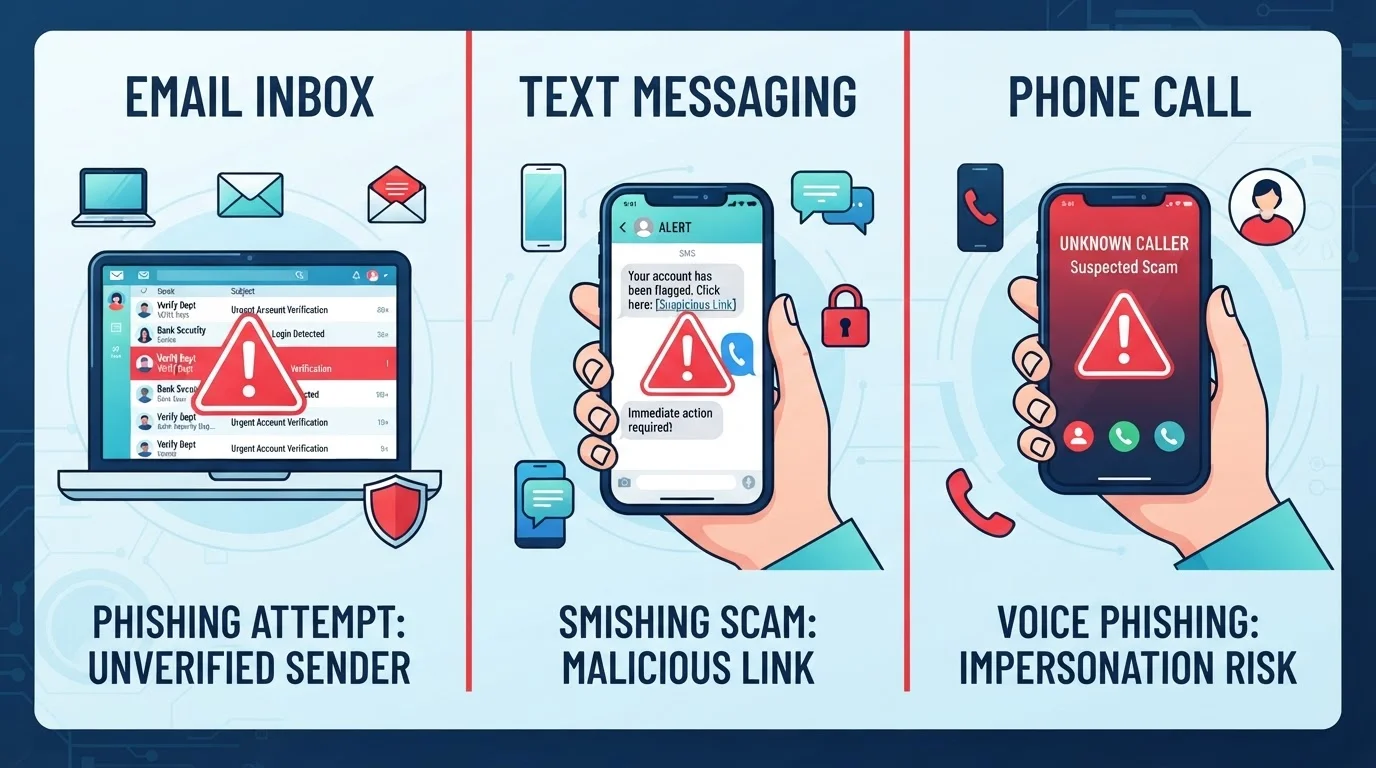
- Phishing, smishing, and vishing are the same scam delivered through different communication channels.
- Urgency, fear, and impersonation of trusted brands are the most common manipulation tactics.
- Legitimate organizations will never demand immediate action or sensitive data via unsolicited contact.
- Verifying through official contact details — not those provided in the message — is the safest response.
- Anyone can be targeted; these attacks are designed to fool careful, intelligent people.
Phishing, Smishing, and Vishing
These three terms all describe the same basic crime — a scammer pretending to be someone trustworthy to steal your personal information or money. Phishing happens over email, smishing over text messages (SMS), and vishing over phone calls. In every case, the goal is to trick you into handing over passwords, account numbers, or other sensitive details.
All three are forms of social engineering — attacks that exploit human psychology rather than technical vulnerabilities, making them effective against people at every level of technical ability.
Why Scammers Use Three Different Channels
Fraudsters are opportunists. They use whichever communication channel gives them the best chance of reaching you when your guard is down. Email inboxes are checked at work. Text messages arrive on personal phones and feel intimate. Phone calls carry a sense of immediate authority that a written message cannot always replicate.
Understanding that all three attacks share the same playbook — impersonate, create urgency, extract information — makes them far easier to recognize regardless of how they arrive. For a broader look at staying safe across all these threats, the Online Safety from End to End guide is a useful starting point.
1 in 3
Adults targeted by phishing each year
The Anti-Phishing Working Group and consumer research consistently find that roughly one third of adults encounter phishing attempts annually across email, text, and voice channels.
98%
Of text messages are opened within minutes
Research on mobile communication habits shows SMS messages have dramatically higher open rates than email, which is a key reason smishing has grown as a preferred scam delivery channel.
$10B+
Lost to fraud reported to the FTC in a single year
The FTC's Consumer Sentinel Network data highlights that impersonation scams — including phone, email, and text fraud — consistently rank among the top reported fraud categories by dollar loss.
Phishing: Fraudulent Emails Designed to Look Real
A phishing email typically mimics a brand you recognize — your bank, a delivery company, a government agency, or a popular online service. The visual design can be convincing: correct logos, professional layout, and plausible sender names. The giveaways are usually in the details.
- Sender address: The display name may say "PayPal Support" but the actual email address ends in a random domain unrelated to the company.
- Urgency and threats: Messages like "Your account will be closed in 24 hours" are designed to make you react before you think.
- Suspicious links: Hover over any link (without clicking) to preview the real URL. A mismatch between the label and the destination is a strong warning sign.
- Unexpected attachments: Legitimate companies rarely send unsolicited attachments. Opening one can install malicious software on your device.
If you receive a suspicious email, do not click any links. Instead, go directly to the organization's website by typing the address into your browser yourself. Read more in our companion piece on how phishing emails are crafted.
Check the Sender Address, Not Just the Name
Email display names are easy to fake. Before trusting any email, click or tap on the sender's name to reveal the actual email address behind it. A message claiming to be from your bank that originates from a random Gmail or unusual domain is almost certainly fraudulent. When in doubt, go directly to the company's website rather than interacting with the email at all.
Smishing: Text Messages That Create False Urgency
Smishing — SMS phishing — exploits the fact that most people read text messages within minutes of receiving them. A smishing message might claim your package is on hold, your bank account has been locked, or you owe a toll fee. A short link follows, designed to look like a real URL but redirecting you to a fake site that harvests your login credentials or payment details.
Key red flags in text messages include:
- Messages from unfamiliar numbers claiming to be a bank, courier, or government agency
- Short links using URL-shortening services that obscure the real destination
- Requests to "verify" personal information by clicking a link or replying
- Prize or refund notifications you never signed up for
Because text messages bypass some email spam filters, smishing is particularly effective. Never tap a link in an unexpected text. If the message claims to be from your bank, call the number on the back of your card instead.
Caller ID Can Be Faked Too
Spoofed caller ID allows scammers to make their calls appear to originate from legitimate numbers — including real government agencies and well-known banks. Seeing a recognizable number on your screen is not proof that the caller is who they claim to be. Always verify independently by calling the official number you find on the organization's website or official documents.
Vishing: The Human Voice as a Tool for Deception
Vishing (voice phishing) puts a real or automated human voice on the line. Scammers may claim to be from the IRS, Social Security Administration, your bank's fraud department, or a tech-support team. Some use caller ID spoofing — a technique that makes the call appear to come from a legitimate number — to add credibility.
Common vishing scenarios include:
- Fake tax emergencies: A caller warns of back taxes owed and demands immediate payment via gift cards or wire transfer — a method no real government agency uses.
- Bank fraud alerts: A caller says suspicious activity was detected on your account and asks you to confirm your card number to "unlock" it.
- Tech-support calls: Someone claiming to be from a major software company says your computer is infected and needs remote access to fix it.
If you feel pressured or uncertain, hang up. Look up the organization's official phone number independently and call back. Protecting your devices from follow-on threats is also worthwhile — see our guide on keeping personal devices secure.
Strengthening Your Defenses After the Scam Awareness Stage
Recognizing scams is the first step; building habits that reduce your risk is the second. A few practical measures make a meaningful difference:
- Use strong, unique passwords for every account. A scammer who obtains one password cannot then access everything else you own.
- Enable multi-factor authentication (MFA) wherever available. Even if a phisher captures your password, they cannot log in without the second factor. For a comparison of the most secure MFA options, see SMS codes vs. authenticator apps.
- Pause before you act. Urgency is the scammer's main weapon. Taking thirty seconds to question whether the message is genuine can be enough to prevent a costly mistake.
- Report suspicious messages. Forward phishing emails to spam@uce.gov or report them to the FTC. Report smishing texts by forwarding them to 7726 (SPAM), a free service supported by most US carriers.
Scammers are constantly refining their techniques, but their core reliance on deception and pressure stays constant. Once you know what they're after and how they ask for it, their messages become far easier to identify and ignore.