

Key Takeaways
- Phishing uses fake emails and texts that impersonate trusted organizations to steal your information.
- Urgency and fear are the attacker's most powerful tools — slow down before clicking anything.
- Legitimate organizations will never ask for passwords or sensitive data via email or text.
- Checking the actual sender address (not just the display name) reveals most phishing attempts.
- Reporting phishing messages helps protect others in your community and improves filters.
Phishing
Phishing is a type of online scam where criminals impersonate trusted organizations — like your bank, a delivery company, or even the IRS — to trick you into handing over sensitive information such as passwords, credit card numbers, or Social Security numbers. The message usually arrives by email or text and creates a false sense of urgency to make you act before you think. The goal is always the same: steal something valuable from you.
Phishing is categorized as a social engineering attack, meaning it exploits human psychology rather than software vulnerabilities. Spear phishing is a more targeted variant where attackers personalize messages using details gathered from social media or data breaches.
How Phishing Messages Are Crafted to Fool You
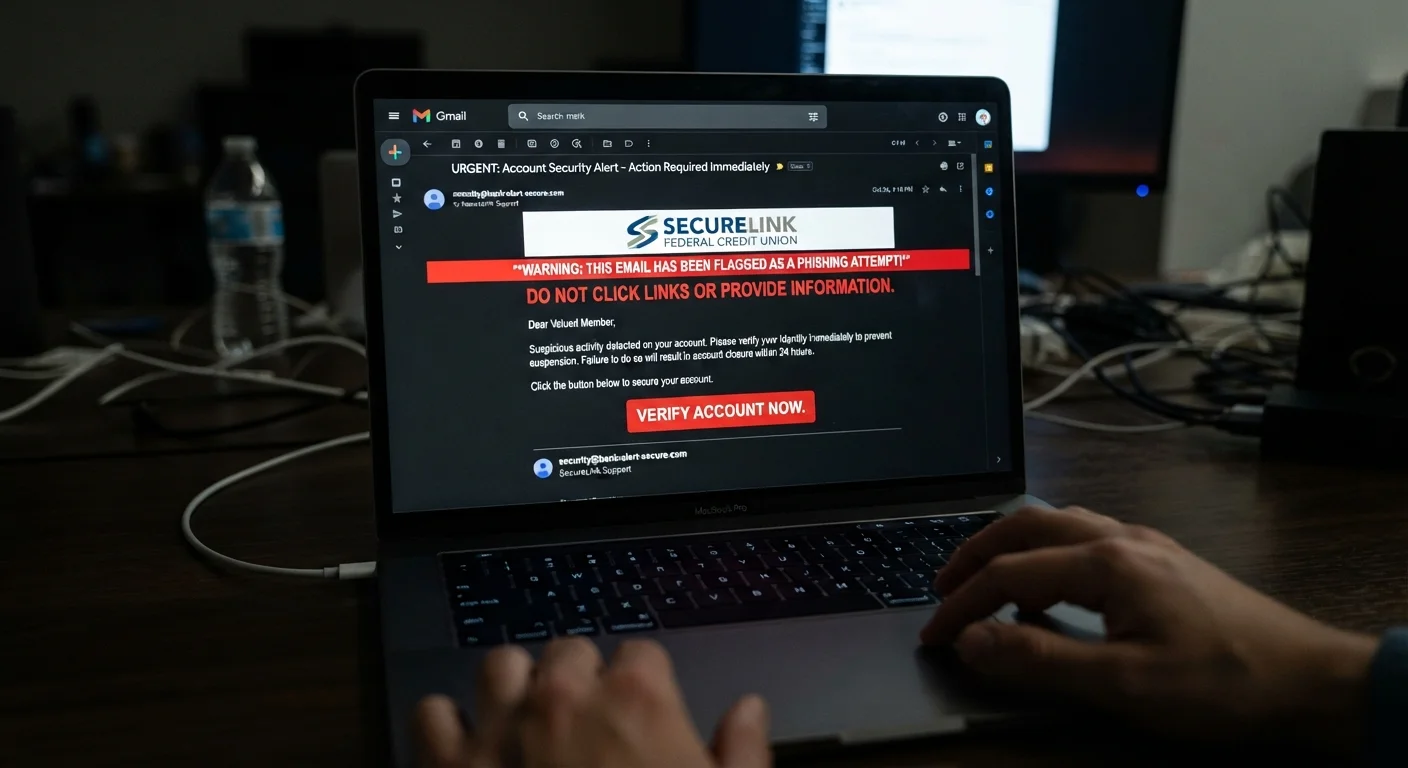
Phishing messages are not the obvious, typo-filled emails they used to be. Modern attacks are carefully designed to look indistinguishable from the real thing. Scammers copy official logos, replicate email formatting, and even spoof sender addresses so the "From" field displays a brand you trust.
The core ingredient is urgency. A phishing message typically tells you that your account has been locked, a package couldn't be delivered, or you owe an overdue payment — and that you must act right now. That pressure is intentional. When people feel rushed, they skip the mental checks they'd normally perform.
The message then directs you to click a link that leads to a convincing fake website, where any information you enter goes straight to the attacker. Some phishing attempts skip the link entirely and simply ask you to reply with sensitive details directly.
Pause Before You Click
Whenever a message creates a strong sense of urgency — account suspended, payment overdue, action required immediately — treat that pressure itself as a warning sign. Legitimate organizations give you reasonable time to respond. Taking 60 seconds to verify a message independently is almost always enough to sidestep a phishing attempt entirely.
For a broader look at how these scams operate across email, text, and voice calls, see Phishing, Smishing, and Vishing: Recognising Online Scams Across Every Channel.
Red Flags That Reveal a Phishing Attempt
Learning to spot the warning signs is the most practical skill you can develop. Here are the most reliable indicators that a message isn't what it claims to be:
- The sender address doesn't match the organization. The display name might say "PayPal Support," but the actual email address could be something like
noreply@paypa1-secure.net. Always click or hover on the sender name to reveal the real address. - Generic greetings. Phrases like "Dear Customer" or "Dear User" suggest the sender doesn't actually know who you are — legitimate companies use your name.
- Suspicious or mismatched links. Hover over any link before clicking. If the URL shown at the bottom of your screen doesn't match the organization's real website, don't click it.
- Requests for sensitive information. No bank, government agency, or reputable business will ever ask for your password, PIN, or full Social Security number by email or text.
- Unexpected attachments. Attachments in unsolicited messages can carry malware. Do not open files you weren't expecting, even if the sender appears familiar.
3.4 billion
Phishing emails sent every day globally
According to estimates cited by cybersecurity researchers, phishing is the most common form of cybercrime by volume.
36%
Of data breaches involve phishing
Verizon's annual Data Breach Investigations Report has consistently found phishing among the top causes of confirmed breaches.
74%
Of organizations experienced phishing attacks
Proofpoint's State of the Phish report found that the vast majority of surveyed organizations dealt with phishing attempts in a given year.
If you're unsure whether a message is real, contact the organization directly using a phone number or website you find independently — not the contact information in the suspicious message itself.
What to Do If You Suspect a Phishing Message
The safest first move is to do nothing. Don't click any links, don't download attachments, and don't reply. Then take these steps:
- Verify independently. Go directly to the organization's official website by typing the address into your browser, or call their published customer service number.
- Report the message. Use your email provider's built-in reporting tool, or forward the email to the Anti-Phishing Working Group at
reportphishing@apwg.org. For texts, forward the message to 7726 (SPAM), which most U.S. carriers support. - Delete the message. Once reported, remove it from your inbox so you're not tempted to interact with it later.
- Check your accounts. If you have any doubt about whether you interacted with the message, log in to relevant accounts directly and look for unusual activity. Signs That Your Account May Have Been Compromised walks you through exactly what to watch for.
Building these habits alongside broader security practices — like using strong, unique passwords and keeping your devices updated — meaningfully reduces your risk. Our guide on keeping your personal devices secure covers those fundamentals in plain language.
Phishing Affects Everyone, Not Just Beginners
Security awareness training companies routinely conduct simulated phishing tests inside large organizations and find that employees at all levels — including managers and IT staff — click on convincing fake messages. Being cautious isn't a sign of inexperience; it's a habit every informed internet user maintains. For a complete picture of staying safe online, see our end-to-end online safety guide.